|
Puse
|
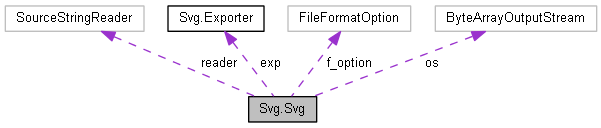
Public Member Functions | |
| String | CombineStrings (String main, String referenced_diagram) |
| String | installSvg (String code) |
| void | installSvg (String code, String filename) |
| String | ReplaceLine (String main, String replacement, int line_number) |
| JSVGCanvas | reload (JSVGCanvas svgCanvas, String name) |
Static Public Member Functions | |
| static String | installToString (File file) |
Public Attributes | |
| Exporter | exp =new Exporter() |
The Class conducts operations for svg file
| String Svg.Svg.CombineStrings | ( | String | main, |
| String | referenced_diagram | ||
| ) |
Creates svg file from string, it validates code and creates svg
| code | the code |

| String Svg.Svg.installSvg | ( | String | code | ) |
Creates svg file from string, it validates code and creates svg
| code | the code |
| void Svg.Svg.installSvg | ( | String | code, |
| String | filename | ||
| ) |
works like installsvg. However, you can explicitly indicate where to save that svg file
| code | the code |
| @return | the string |
|
static |
Load a text file contents as a String. This method taken from http://www.avajava.com/tutorials/lessons/how-do-i-read-a-string-from-a-file-line-by-line.html
| file | The input file |
String | IOException | IO Error |

| JSVGCanvas Svg.Svg.reload | ( | JSVGCanvas | svgCanvas, |
| String | name | ||
| ) |
Reload svg file to canvas
| svgCanvas | component name |
| name | the name of file which will be loaded |
| String Svg.Svg.ReplaceLine | ( | String | main, |
| String | replacement, | ||
| int | line_number | ||
| ) |
Replaces given line with another string in multi line strings
| String | main string |
| String | replacement |
| int | line number |

 1.8.3.1
